
PDF to Quiz Generator: Create Quiz Questions from PDFs in Seconds
TL;DR:
A PDF to quiz generator uses AI to analyze document content and automatically create multiple-choice, true/false, and multi-select questions. This guide covers how the technology works, who benefits most, what to look for when choosing a tool, and how to get the best results from your PDFs.
Introduction
Creating quizzes from PDFs can be time-consuming. Whether you are a teacher preparing classroom assessments, a student building practice tests from lecture notes, instructor preparing quizzes for the course or a corporate trainer developing compliance evaluations, manually writing questions from lengthy documents takes hours most educators and trainers don’t have.
A PDF to quiz generator solves this problem by using artificial intelligence to analyze PDF content and generate relevant quiz questions in seconds – not hours.
In this guide, you will learn how PDF-to-quiz technology works, the research behind why quizzing improves learning outcomes, and how to quickly turn any PDF into an engaging assessment using AI.
A PDF to quiz generator solves this problem by using artificial intelligence to analyze PDF content and generate relevant quiz questions in seconds – not hours.
In this guide, you will learn how PDF-to-quiz technology works, the research behind why quizzing improves learning outcomes, and how to quickly turn any PDF into an engaging assessment using AI.
What is a PDF to Quiz Generator?
A PDF to Quiz Generator is an AI-powered tool that reads, understands, and convert PDF documents into structured quiz questions automatically.
Instead of reading through pages of content and writing questions manually, you upload your PDF and the AI identifies key concepts, definitions, facts, and learning objectives. The tool then generates relevant quiz questions that reflect the document’s actual content not generic questions loosely related to the topic.
Most modern PDF quiz generators support multiple formats:
Instead of reading through pages of content and writing questions manually, you upload your PDF and the AI identifies key concepts, definitions, facts, and learning objectives. The tool then generates relevant quiz questions that reflect the document’s actual content not generic questions loosely related to the topic.
Most modern PDF quiz generators support multiple formats:
- Multiple-choice questions (with configurable answer options)
- Multi-select questions
- True-or-false questions
- Short-answer and fill-in-the blanks questions
- Knowledge checks with immediate feedback
- Full practice assessments with scoring
This makes them valuable for educators, students, corporate trainers, HR teams, and course creators who need to scale-assessment creation without sacrificing quality.
Why Create Quizzes from PDFs?
PDFs remain one of the most common formats for distributing learning and training materials. Research from the Brandon Hall Group found that organizations using technology-enabled assessments see a 38% improvement in knowledge retention compared to passive reading alone.
Unfortunately, training those PDF materials into assessments is where the bottleneck happens. Writing 20-30 quality quiz questions from a 50-page training manual can take 3-5 hours of focused work.
Using a PDF to quiz generator changes that equation.
Unfortunately, training those PDF materials into assessments is where the bottleneck happens. Writing 20-30 quality quiz questions from a 50-page training manual can take 3-5 hours of focused work.
Using a PDF to quiz generator changes that equation.
Save Hours of Manual Work
Manually creating one good multiple-choice question – complete with plausible distractors takes roughly 2 – 3 minutes per question. A 25 question quiz from a textbook chapter can consume 60-90 minutes. AI-powered tools can generate a complete draft quiz in under 60 seconds, cutting question-creation time by over 90%.
Improve Learning Retention Through Active Recall
A 2013 meta-analysis published in Psychological Science in the Public Interest reviewed hundreds of studies and concluded that practice testing (active recall) is one of the two most effective learning techniques that significantly outperforming re-reading, highlighting, and summarization. Quizzes force learners to retrieve information rather than passively recognize it, which strengthens long-term memory.
Scale Assessment Creation Without Scaling Workload
For organizations that train hundreds of employees or institutions with multiple courses, creating assessments for every module becomes logistically impossible without automation. A quiz generator lets you produce assessments for multiple documents simultaneously.
Identify Knowledge Gaps Before They Cause Problems
Well-designed quizzes surface which concepts learners understand and which topics need revisiting data that’s invisible during passive reading. In corporate training contexts, this translates directly to fewer on-the-job errors.
How a PDF to Quiz Generator Works
Modern AI quiz generators follow a five-step process. Here’s what happens after you upload a file:
Step 1: Upload Your PDF
Supported document types typically include lecture notes, training manuals, eBooks, study guides, textbook chapters, and instructional materials. Most tools accept PDFs up to 50 – 100MB.
Step 2: AI Parses and Understands the Content
The system extracts text from the PDF (including multi-column layouts), identifies the document structure, and uses natural language processing to understand relationships between concepts. It distinguishes main ideas from supporting details and flags definitions, statistics, and key facts as high-priority question material.
Step 3: Questions Are Generated
The AI creates quiz questions mapped to most important content in the document. Modern systems can generate plausible distractors (wrong answers) for multiple-choice questions by drawing from related but incorrect concepts in the text which produces more effective test questions than random incorrect options.
Step 4: Review and Customize
You review the generated questions, edit wording if needed, remove questions that don’t fit your learning objectives, and adjust difficulty levels. Most tools let you select question types and reorder questions.
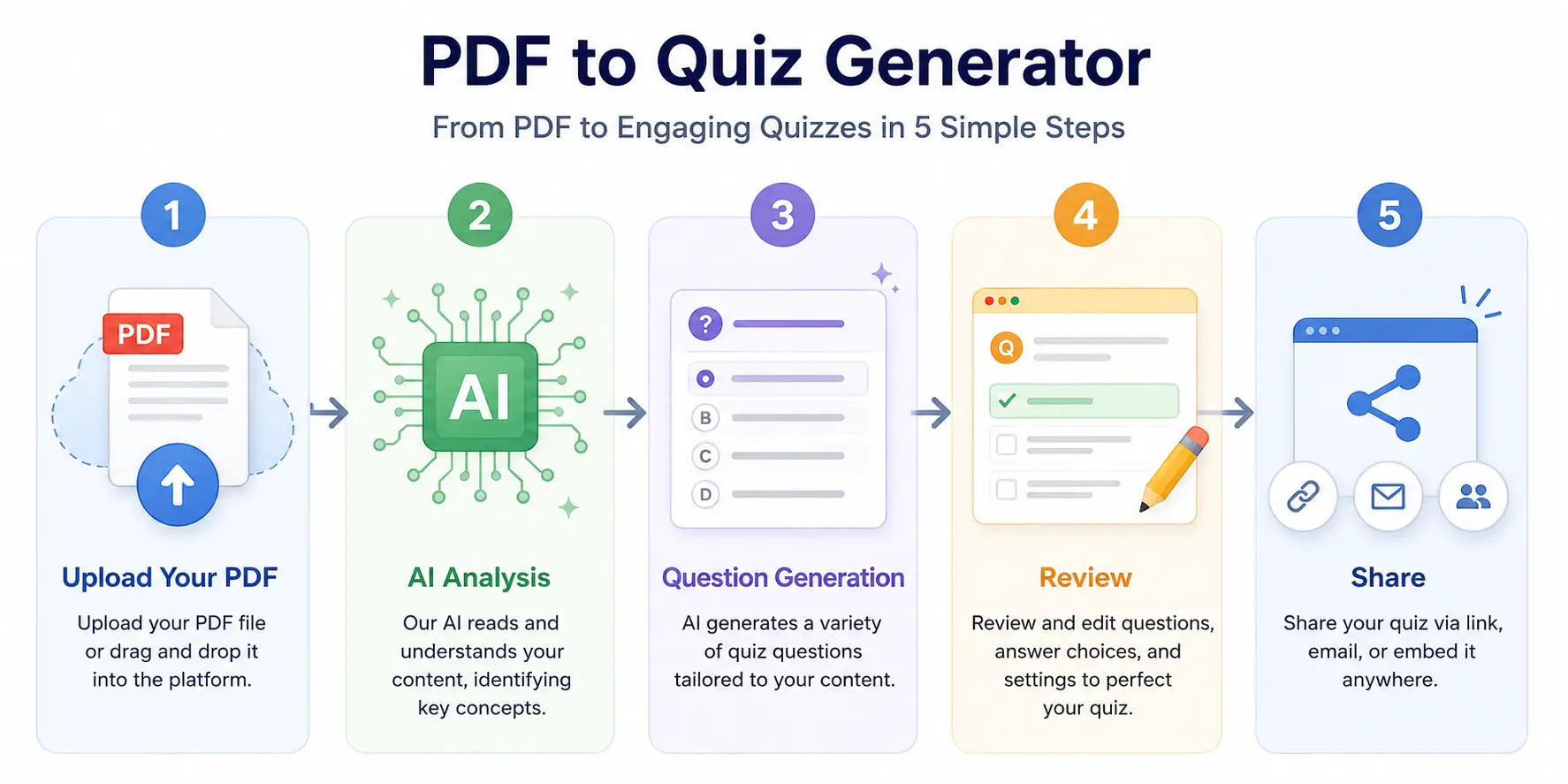
Step 5: Share or Export
Publish the quiz online, share a link with learners, embed it in an LMS, or export in formats compatible with platforms like Canvas, Moodle, or Google Classroom.
Who Benefits from a PDF to Quiz Generator?
| Role | Primary Use Case | Time Saved (est.) |
| Teachers | Convert lesson plans and worksheets into formative assessments | 3-5 hours/week |
| Students | Turn lectures notes and study guides into practice tests | 2-4 hours per exam |
| Corporate Trainers | Create compliance and onboarding assessments from internal docs | 5-10 hours per training module |
| Course Creators | Generate quizzes that increase course engagement and completion rates | 10-20 hours per course |
| HR Teams | Evaluate employee understanding of policies and procedures | 3-6 hours per policy update |
Teachers
Teachers can transform lesson plans, worksheets, and reading assignments into informative assessments in minutes. Instead of spending Sunday evenings writing quiz questions, teachers can upload their weekly materials and get a draft quiz back immediately, freeing time for lesson planning and student feedback.
Students
Students using self-testing as a study strategy consistently outperform peers who re-read notes. Converting lecture PDFs and textbook chapters into practice tests turns passive review into active retrieval practice. A study published in Science found that students who took practice tests retained 50% more information one week later compared to students who studied by re-reading.
Corporate Trainers
Training teams managing onboarding programs, compliance training, and skills development can create assessments directly from existing training manuals and internal documentation. This is especially valuable for industries with frequent regulatory updates where training materials and assessments need to stay synchronized.
Course Creators
Online educators can generate quizzes that increase course completion rates. Data from Thinkific’s 2025 Learning Trends Report shows that courses with embedded quizzes have 25-40% higher completion rates than video-only courses, because assessments create natural checkpoints that keep learners engaged.
HR Teams
When company policies or procedures change, HR teams need to verify that employees understand the updates. Automatically generating assessments from policy documents speeds up the compliance verification cycle and creates an auditable record of understanding.
Common Use Cases (with Examples)
Here are seven real-world applications for PDF-to-quiz technology:
GreenShift – Page-Building Gutenberg Blocks
1
Lecture notes to practice tests:A biology professor uploads their 40-slide lecture PDF on cellular respiration and generates a 30-question multiple-choice practice test for students in under two minutes.
2
Textbook chapters to chapter quizzes:A high school history teacher converts each textbook chapter into a 15-question reading check to ensure students completed and understood the assigned reading.
3
Employee handbooks to compliance assessments:An HR director uploads the company’s updated code of conduct (60-page PDF) and generates a 25-question assessment that every employee must pass annually.
4
Training manuals to skills verification:A manufacturing trainer converts equipment operation manuals into safety certification quizzes, ensuring operators demonstrate knowledge before using machinery.
5
Certification prep to mock exams:A project management instructor converts the PMBOK guide summary into a 200 question mock exam that mirrors the PMP certification format.
6
Workshop materials to knowledge checks:A conference organiser turns workshop handouts into post-session quizzes that attendees complete to earn continuing education credits.
7
Research papers to journal club discussions:A graduate program coordinator converts assigned journal articles into guided discussion quizzes that ensure students arrive prepared for seminar.
What to Look for in a PDF to Quiz Generator
Not all quiz generators produce equal results. Here’s what separates effective tools from the rest:
| Feature | Why It Matters |
| Content-aware question generation | Questions should reflect the actual PDF content, not generic templates filled with keywords. |
| Multiple question types | MCQs test recognition; short-answer tests recall. A mix of both produces stronger learning outcomes. |
| Plausible distractors | Poorly generated wrong answers make multiple-choice questions too easy and reduce learning benefit. |
| Processing speed | Large documents (100+ pages) should generate quizzes in under 2-3 minutes. |
| Editing interface | You should be able to modify, reorder, and delete questions before publishing. |
| Export options | LMS compatibility (Canvas, Moodle, Google Classroom) prevents manual re-entry. |
| Batch processing | Enterprise users should be able to process multiple PDFs simultaneously. |
Red Flags to Avoid
- Tools that generate questions without actually reading your PDF (keyword matching only)
- Platforms with no editing capability (you are stuck with whatever the AI produces)
- Services that limit you to one question type
- No export or sharing options (quiz trapped in the tool)
Generate Quizzes from PDFs with AutoQuizBuilder
AutoQuizBuilder makes it easy to transform PDFs into engaging quizzes in a few clicks. Here’s what sets it apart:
- AI-powered analysis: The system reads and understands your PDF content before generating questions – not just keyword extraction
- Multiple question types: Multiple-choice, true/false, multi-select, and fill-in-the-blanks format in a single quiz.
- Fast processing: Most PDFs are processed and ready for review in under 60 seconds
- Full editing control: Review every question, edit wording, swap question types, and adjust difficulty before publishing
- Built for collaboration: Share quizzes with colleagues, assign to learner groups, and track results from one dashboard.
Frequently Asked Questions
Can AI really create accurate quizzes from PDFs?
Yes. Modern AI-powered PDF quiz generators use natural language processing to identify key concepts, definitions, and relationships within document content. The accuracy depends on three factors: (1) the quality of the source PDF (well-structured text documents produce the best results), (2) the sophistication of the AI model powering the tool, and (3) whether a human reviews the output. Research from Google DeepMind (2024) on question generation benchmarks shows that state-of-the-art models can generate questions that are rated as indistinguishable from human-written question in blind evaluation when working with well-structured source material. That said, always review AI-generated questions before using them in high-stakes assessments.
Are AI-generated quiz questions accurate enough for graded exams?
For low-stakes formative assessments (practice quizzes, knowledge checks, homework), AI-generated questions are generally accurate enough after a brief human review. For high-stakes summative assessments (final exams, certification tests, compliance evaluations), AI-generated questions should serve as a starting point an efficient first draft that an instructor or subject matter expert reviews and refines. The best workflow uses AI for speed and humans for quality assurance.
What types of PDFs produce the best quiz questions?
Structured, text based documents with clear heading hierarchies produce the highest-quality questions. The best results come from:
- Study guides and lecture notes
- Training manuals
- Textbook chapters
- eBooks and instructional materials
- Technical documentation
Scanned image-based PDFs, heavily formatted documents (magazine layouts, multi-column academic papers), and PDFs with embedded charts or diagrams may require processing.
Can I edit questions after they are generated?
Yes, and you should. Every reputable PDF quiz generator includes an editing interface where you can modify question wording, change question types, adjust answer choices, remove questions, and reorder the quiz. AI-generated questions are a time-saving starting point, not a finished product. Plan to spend 5-10 minutes reviewing and refining a 25-question quiz.
How long does it actually take to create a quiz from a PDF?
With AI-powered tools, the automated generation phase typically completes in 30-90 seconds for most PDFs (under 100 pages). And 5-15 minutes for human review and editing, depending on quiz length and the stakes of the assessment. The total workflow: upload, generate, review, and publish is typically 10-20 minutes, compared to the 2-5 hours it would take to write the same quiz manually.
Is my PDF content secure when I upload it to a quiz generator?
This depends on the tool. Look for platforms that state their data handling policies clearly: SSL/TLS encryption for uploads, deletion policies for processed files, and compliance with relevant regulations (GDPR, FERPA for education tools). AutoQuizBuilder encrypts all uploads in transit and at rest, and processed PDFs are automatically deleted after 30 days. Review any tool’s privacy policy and terms of service before uploading sensitive or proprietary documents.
Conclusion
A PDF to quiz generator transforms static documents into interactive assessments, cutting hours of manual question-writing down to minutes of review. The research is clear: active recall through quizzing is one of the most effective learning strategies available, and AI now makes it practical to create assessments for every document, not just the ones you have time to write questions for.
Whether you are an educator building formative assessments, a student creating practice tests, a teacher creating exam questions, or a training manager scaling compliance evaluations, the right AI-powered quiz generator saves time, improves learning outcomes, and makes assessment creation sustainable at any scale.
Whether you are an educator building formative assessments, a student creating practice tests, a teacher creating exam questions, or a training manager scaling compliance evaluations, the right AI-powered quiz generator saves time, improves learning outcomes, and makes assessment creation sustainable at any scale.
Next Steps
Try it yourself: Upload a PDF and generate a quiz in 60 seconds – free trial, no credit card required
This guide draws on established learning science research, including Dunlosky et al. (2013) “Improving Students’ Learning With Effective Learning Techniques” (Psychological Science in the Public Interest) and Karpicke & Blunt (2011) “Retrieval Practice Produces More Learning than Elaborative Studying with Concept Mapping” (Science). For questions or corrections, contact